A few days ago, Docker published an article on LinkedIn about a new tool called Docker Sandboxes (sbx). The pitch is simple: run AI coding agents in fully autonomous mode, without worrying about them touching your host machine.
I read it and decided to install it on my MacBook Pro M4 (32 GB RAM) and test it for real. Not to read the documentation and summarize it, but to actually break things, observe what happens, and verify the security claims hands-on.
This is what I found.
The Problem It Solves
If you use AI coding agents regularly, you know the appeal of letting them run fully autonomously: open a repo, give a task, step away, come back to a working pull request. What the community calls YOLO mode. The instinct to keep asking for confirmation at every step is the right one: agents are powerful, and unchecked actions on your own machine can go wrong quickly. But constantly interrupting the agent defeats the purpose. The real need is not choosing between oversight and productivity. It is having a boundary solid enough that you can drop the interruptions, because the damage radius is contained by design.
The problem is that running an agent in YOLO mode on your own machine is genuinely risky. An autonomous agent has access to everything your user account can reach: your home directory, your SSH keys, your environment variables, your host Docker daemon. Mistakes are not hypothetical: rm -rf on the wrong directory, or leaking an API key into a log file, are real scenarios.
The classic approaches to contain this risk have real tradeoffs. Mounting the Docker socket exposes the host daemon. Docker-in-Docker requires privileged containers. Running on the host offers no isolation at all. None of these give you a proper boundary.
Docker Sandboxes takes a different approach: each agent runs inside its own microVM, with a separate kernel, a separate Docker daemon, and a network proxy that enforces an explicit allow-list. Inside that boundary, the agent can do whatever it needs. Outside it, nothing leaks.
Installation and Setup
sbx is a standalone CLI; it does not require Docker Desktop. On macOS:
brew tap docker/tap
brew install docker/tap/sbx
After installation, you need to log in with a Docker account:
sbx login
This starts a device-flow authentication. You get a one-time code, open a URL, confirm, and you are done. As part of login, sbx starts a background daemon and asks you to choose a default network policy for your sandboxes:
- Open: all traffic allowed
- Balanced: default deny, with common developer sites allowed
- Locked Down: all traffic blocked unless explicitly allowed
I chose Balanced, which is the right default for most use cases. You can change this at any time with sbx policy reset or add individual rules with sbx policy allow network <host>.
Once logged in, check everything is working:
sbx version
# Client Version:  v0.23.0
# Server Version:  v0.23.0
The Interactive Dashboard
Before diving into the internals, worth knowing: running sbx with no subcommand opens a full-screen terminal dashboard.
sbx
The dashboard shows all your sandboxes as live cards (status, CPU usage, and memory consumption) updating in real time. From there, the main keyboard shortcuts are:
| Key | Action |
|---|---|
c | Create a new sandbox |
s | Start or stop the selected sandbox |
Enter | Attach to the agent session (same as sbx run) |
x | Open a shell inside the sandbox (same as sbx exec) |
r | Remove the sandbox |
Tab | Switch to the network panel |
? | Show all shortcuts |
The network panel is the most interesting part. It shows a live log of every outbound connection your sandboxes are making: host, proxy rule that matched, and timestamp. From the same panel you can allow or block individual hosts on the fly, without dropping to the CLI. If a sandbox starts hitting something unexpected, or if you want to tighten the allow-list after watching what an agent actually calls, this is where you do it.
For most operations the CLI commands are faster, but the network panel in particular is genuinely useful for understanding what an agent is doing at runtime, especially the first time you run a new agent template.
What’s Inside a Sandbox
Before trusting any security claim, I wanted to verify the isolation myself. I created a shell sandbox and ran a series of probes against it.
cd ~/my-project
sbx create --name test-exploration shell .
sbx exec test-exploration uname -a
# Linux test-exploration 6.12.44 #1 SMP Wed Apr  1 05:13:56 UTC 2026 aarch64 GNU/Linux
A separate Linux kernel, running on ARM64 (Apple Silicon). Not a container, but an actual VM.
sbx exec test-exploration sh -c "cat /etc/os-release | grep PRETTY"
# PRETTY_NAME="Ubuntu 25.10 (Questing Quokka)"

sbx exec test-exploration sh -c "nproc && free -h"
# 4
# Mem: 15Gi  ...  Swap: 0B
Four vCPUs and 15 GB of RAM, 50% of the MacBook Pro’s 32 GB, which is the default. You can override this with --memory:
sbx create --name agent-task --memory 4g claude .
The agent user inside the VM is agent (uid=1000), a member of both the sudo and docker groups:
sbx exec test-exploration id
# uid=1000(agent) gid=1000(agent) groups=1000(agent),27(sudo),1001(docker)
Full sudo. Full Docker access. Inside the boundary, the agent genuinely has everything it needs to work. The next step is verifying that the boundary itself actually holds.
Verifying the Isolation Layers
Before going layer by layer, here is the full isolation model at a glance: this is what Docker describes in their security documentation and what the next sections verify hands-on:
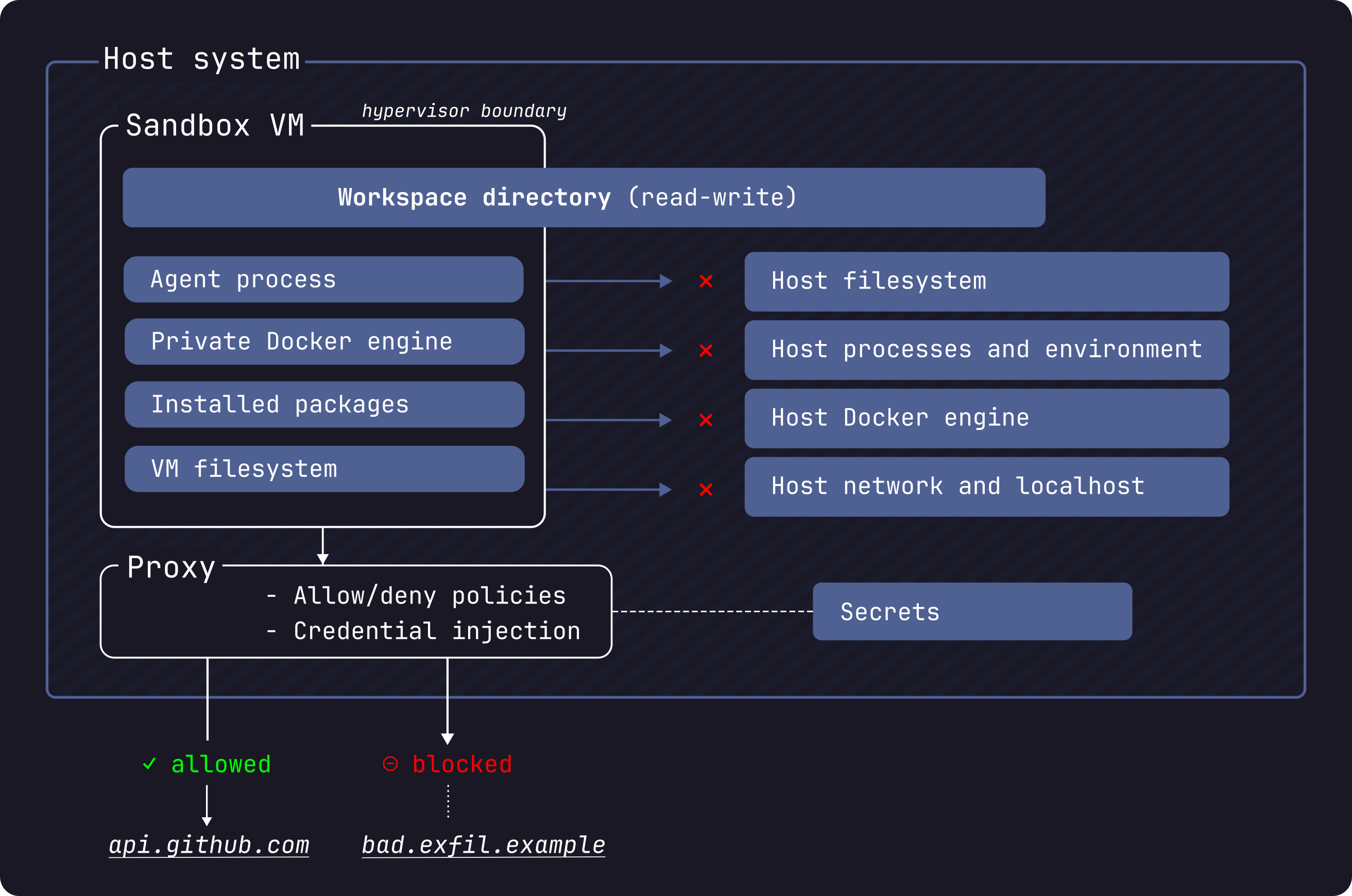
The hypervisor boundary is the outermost trust perimeter. The shared workspace and the credential proxy are the only intentional channels across it; everything else is blocked at the kernel level.
Filesystem
The workspace is mounted inside the VM at the same absolute path as on the host. This is intentional: it means error messages and build outputs reference paths you can find locally without any translation.
What is important to understand is that only the workspace directory is real. The parent directories exist inside the VM as empty scaffolding to preserve the absolute path, but they are not the host filesystem.
I verified this directly:
sbx exec test-exploration sh -c "ls -la /Users/matteo.bisi/"
# drwxr-xr-t 3 root root 4096 ... GitRepo   ← empty scaffold

sbx exec test-exploration sh -c "cat /Users/matteo.bisi/.zshrc"
# cat: /Users/matteo.bisi/.zshrc: No such file or directory
The VM can see the directory tree down to the workspace, but cannot read any file outside it. Your SSH keys, shell configs, and credentials are not accessible.
One important nuance from the documentation: workspace changes are live on the host in real time. The agent edits the same files you see on your machine. This includes Git hooks (which live inside .git/ and do not appear in git diff), Makefiles, and CI configs. After any agent session, review these files before running anything locally.
Docker
The architecture here is more layered than it first appears. Each sandbox is a microVM, and inside that VM a Docker Engine runs. The agent itself (Claude, Copilot CLI, whatever you launched) runs as a Docker container managed by the VM’s own daemon. You can verify this by inspecting the cgroup of the init process inside any sandbox:
sbx exec test-exploration sh -c "cat /proc/1/cgroup"
# 0::/docker/255bd610f29282b475f0bdf29015925be38426de6d64fcca56f2cd3445c5efca
The path prefix /docker/... confirms it: the root process is running inside a Docker container, not directly on the VM’s init. The VM’s Docker Engine is the one managing it.
When the agent then calls docker build or docker run, those commands go to /var/run/docker.sock, which is socket-mounted into the agent container from the VM’s daemon. That daemon is completely separate from your host’s Docker socket. There is no path from inside the sandbox to your host daemon.
sbx exec test-exploration docker version
# Server: Docker Engine - Community, Version: 29.3.1
You can pull images and run containers inside the sandbox freely:
sbx exec test-exploration docker run --rm alpine uname -a
# Linux bb4037242d29 6.12.44 #1 SMP ... aarch64 Linux
This is the full stack, visualised:
The key insight: if you run three sandboxes (say, claude, copilot, and shell), you get three independent VMs, each with its own Docker Engine and its own agent container. They do not share images, layers, or daemon state. The isolation is not namespace-based like regular Docker; it is a full hypervisor boundary per sandbox.
Network
All outbound HTTP and HTTPS traffic routes through a host-side proxy at gateway.docker.internal:3128. The proxy enforces your network policy. Anything not on the allow-list gets a 403 response: active enforcement, not a silent drop.
sbx exec test-exploration sh -c "curl -s --max-time 5 -o /dev/null -w '%{http_code}' https://randomsite.example.com"
# 403

sbx exec test-exploration sh -c "curl -s --max-time 5 -o /dev/null -w '%{http_code}' https://github.com"
# 200
Raw TCP, UDP, and ICMP are blocked at the network layer. The sandbox cannot reach your host’s localhost either.
The Balanced policy ships with five default categories covering AI APIs, package managers, code hosting (GitHub, GitLab, Docker registries), cloud infrastructure, and OS package repositories. You can inspect them with:
sbx policy ls
A note on the defaults: some rules are broad. *.googleapis.com and *.amazonaws.com wildcards cover many services beyond AI APIs. If you are running sensitive workloads, review the list and remove what you do not need.
Credential Injection
This is the most clever part of the architecture. API keys for AI services are never stored inside the VM. Instead, the proxy intercepts HTTPS requests to known API endpoints and injects the authentication headers transparently.
Inside any sandbox, you can verify this directly:
sbx exec test-exploration sh -c "env | grep -i KEY"
# NEBIUS_API_KEY=proxy-managed
# OPENAI_API_KEY=proxy-managed
# XAI_API_KEY=proxy-managed
# ANTHROPIC_API_KEY=proxy-managed
# MISTRAL_API_KEY=proxy-managed
# GEMINI_API_KEY=proxy-managed
# GOOGLE_API_KEY=proxy-managed
The values are placeholders. The real keys live on the host and are injected by the proxy at request time. The agent can call the APIs, but it cannot read, exfiltrate, or log the actual credentials.
This works through TLS interception. The proxy installs a custom CA certificate inside the VM at login time: “Docker Sandboxes Proxy CA”, a per-session self-signed certificate valid ten years. The sandbox trusts this CA, allowing the proxy to terminate and re-encrypt HTTPS connections.
sbx exec test-exploration sh -c "echo \$PROXY_CA_CERT_B64 | base64 -d | openssl x509 -noout -subject -dates"
# subject=O=Docker Sandboxes, CN=Docker Sandboxes Proxy CA
# notBefore=Apr  3 10:32:47 2026 GMT
# notAfter=Mar 31 10:32:47 2036 GMT
GitHub tokens are managed separately via sbx secret:
sbx secret set -g github        # stores token, injects into api.github.com requests
sbx secret set -g anthropic     # stored and injected for Anthropic API
sbx secret set my-sandbox openai  # scoped to a specific sandbox
Running GitHub Copilot CLI Inside the Sandbox
sbx ships with dedicated templates for eight agents: claude, codex, copilot, docker-agent, gemini, kiro, opencode, and shell. The copilot template is designed for the standalone GitHub Copilot CLI.
sbx create --name test-copilot copilot .
This pulls docker/sandbox-templates:copilot and sets up the environment. The template comes with GitHub Copilot CLI v1.0.19, gh v2.46.0, Node.js 20, Python 3.13, Git 2.51, and Docker 29.3.1 pre-installed. Importantly, each agent template ships pre-configured for autonomous operation: when you run sbx run, the Copilot CLI starts in YOLO mode (--yolo) automatically. You do not need to pass any flags. The sandbox boundary is what makes that safe.
Here is where running Copilot CLI inside the sandbox broke; documenting it is worth the detour.
The Default Policy Does Not Work for Individual Accounts
When I first tried running Copilot CLI inside the sandbox, it failed with this error (visible in the logs at ~/.copilot/logs/):
[ERROR] Error loading models: ProxyResponseError: HTTP 403 response does not appear
to originate from GitHub. Is a proxy or firewall intercepting this request?
https://gh.io/copilot-firewall
The Copilot CLI has its own anti-MITM detection. When it receives a 403 that does not look like a genuine GitHub response, it aborts. Two security mechanisms in direct conflict.
The root cause: the Balanced policy only allows **.business.githubcopilot.com, which covers business and enterprise accounts. Individual accounts use api.individual.githubcopilot.com, a different subdomain not in the default allow-list.
The fix: add the missing domains before creating your copilot sandbox.
sbx policy allow network '**.githubcopilot.com'
sbx policy allow network copilot-proxy.githubusercontent.com
sbx policy allow network origin-tracker.githubusercontent.com
sbx policy allow network copilot-telemetry.githubusercontent.com
sbx policy allow network collector.github.com
sbx policy allow network default.exp-tas.com
The double asterisk (**) is important: it matches multiple subdomain levels. *.githubcopilot.com only matches one level, which is not enough.
Authentication and the Complete Workflow
The intended workflow is straightforward. Store your GitHub token as a global secret before creating the sandbox:
# Step 1 — store the secret (once, persists across sessions)
echo "$(gh auth token)" | sbx secret set -g github

# Step 2 — create the sandbox
sbx create --name test-copilot copilot .

# Step 3 — run it
sbx run test-copilot
When the sandbox is created with a github secret already configured, the proxy is set up to inject the real token into outbound requests to api.github.com. The Copilot CLI exchanges that token for a short-lived Copilot session token and uses it for all subsequent model calls. You should not need to pass credentials manually.
You can verify the proxy injection is working with a raw curl from inside the sandbox:
sbx exec test-copilot sh -c "curl -s https://api.github.com/user | grep login"
# "login": "matteobisi"
The GH_TOKEN inside the VM is always the placeholder proxy-managed; the actual credential never enters the VM. The proxy replaces the Authorization header transparently on the way out.
Known Issue: proxy-managed Rejected by Copilot CLI
Worth noting upfront: when I started working on this article on Friday everything worked out of the box. This regression appeared with the latest update. sbx is moving at a fast pace and I would not be surprised if this is already fixed by the time you read this; check docker/sbx-releases#17 for status.
The bug affects Copilot CLI v1.0.19 and breaks the intended workflow. The CLI validates the token format locally before making any HTTP request. proxy-managed does not match any recognised GitHub token prefix (gho_, ghp_, github_pat_), so the CLI silently discards it and proceeds unauthenticated; the proxy never gets a request to intercept. The result is the 400 error you see in the logs:
[ERROR] Unsupported token type, ignoring.
[ERROR] Error loading models: Error: 400 "bad request: Authorization header is badly formatted"
Workaround until the bug is fixed. After creating the sandbox, write the real token directly into the sandbox’s persistent environment file:
sbx exec test-copilot bash -c \
  "echo 'export GH_TOKEN=$(gh auth token)' >> /etc/sandbox-persistent.sh"
This file is sourced by every login shell inside the VM, so the copilot agent picks up the real token on startup. After this, sbx run test-copilot works as intended.
After the Fix
Once policies and credentials are in place, the interactive session works correctly:
sbx run test-copilot
Hello! I'm GitHub Copilot CLI, your terminal assistant. How can I help you today?

Total usage est:        1 Premium request
API time spent:         3s
Total session time:     5s
Breakdown by AI model:
 claude-sonnet-4.6    19.5k in, 25 out, 12.6k cached (Est. 1 Premium request)
The agent is running inside a microVM, talking to the Copilot API through the sandboxed proxy, editing files that appear live on the host; the host machine is completely out of reach. Once credentials and policies are correctly configured, it behaves exactly as you would expect from a local session, with none of the local risk.
The git Worktree Option
One feature worth highlighting is --branch. Instead of mounting your current workspace directly, sbx can create a Git worktree on a new branch, giving the agent a fully isolated copy of the codebase:
sbx run claude --branch auto .
# or with a specific branch name
sbx run claude --branch feature/agent-task .
When you remove the sandbox with sbx rm, the worktree and branch are cleaned up automatically.
This is my favourite mode, and the one I will be rolling out with my security team. Here is why.
The microVM boundary protects your host machine; that problem is solved. But there is a second boundary that matters just as much: the boundary between what the agent wrote and what actually lands in production. A YOLO agent is powerful precisely because it acts without asking. That same property means you should never let its output reach a shared branch, a CI pipeline, or a deployment without a human reviewing it first.
--branch makes that review mandatory by design. The agent works entirely on its own worktree, isolated from your main branch. When the session ends, nothing has changed on main. The workflow becomes:
- Agent runs: fully autonomous, on its own branch inside the sandbox
- Human reviews:
git diff, read the changes, check Git hooks and CI configs too (they do not appear ingit diff) - Pull request: open a PR from the agent branch, go through your normal code review process
- Merge: only after a human has validated the output
This is not about distrusting the agent. It is about keeping the same engineering rigour you would apply to any external contribution. The agent is a powerful collaborator, not a bypass for your review process. From a security standpoint this is non-negotiable: autonomous agents can introduce subtle logic errors, overly permissive configurations, or dependency changes that look harmless in isolation but matter in context. A PR gate is the minimum control.
The .sbx/ directory where worktrees live should be added to your .gitignore:
echo ".sbx/" >> .gitignore
And the full cleanup when done:
sbx rm <sandbox-name> # removes sandbox, worktree, and branch automatically
Takeaways
Working safely with AI agents is not optional; it is a requirement. Not because agents are malicious, but because speed without boundaries is a liability, and in a security team that liability has a name: incident.
I have spent a meaningful amount of time evaluating how to introduce autonomous AI agents into my team’s workflow without compromising the principles we enforce on everyone else. The answer has to be the same whether a human or an agent is touching the codebase: isolation first, review before merge, least privilege on credentials and network. What I found in Docker Sandboxes is a tool that actually respects those principles without making the workflow painful.
The microVM isolation is real and verified. The network enforcement is active and auditable. The credential injection is clever enough that API keys never enter the VM, which is the kind of design decision that earns trust. And the --branch mode closes the loop on the one remaining risk: the agent’s output going anywhere before a human has reviewed it.
As a Security Team Leader, I can approve and recommend this approach. It is simple, straightforward, and low-friction enough that engineers will actually use it, which is the only security control that works. You do not need a PhD in container security to understand the trust model: the microVM is the boundary, the proxy is the gate, and the branch is the checkpoint. Three layers, clearly defined, independently verifiable.
The integration with Git branching makes it fully compliant with human-in-the-loop requirements, aligning naturally with standard PR workflows, code review processes, and the traceability demands of frameworks like DORA. At the same time, when YOLO mode is what you need (a fast exploration, a bulk refactor, a spike), it is as fast as it needs to be. Speed and control are not a trade-off here; they are both available, and the mode you choose makes the risk profile explicit.
This is the direction AI-assisted development needs to go. Big kudos to Docker for shipping it.
Quick Reference
# Install
brew tap docker/tap && brew install docker/tap/sbx

# Login and set network policy
sbx login

# Fix policy for GitHub Copilot CLI (individual accounts)
sbx policy allow network '**.githubcopilot.com'
sbx policy allow network copilot-proxy.githubusercontent.com
sbx policy allow network origin-tracker.githubusercontent.com
sbx policy allow network copilot-telemetry.githubusercontent.com
sbx policy allow network collector.github.com
sbx policy allow network default.exp-tas.com

# Store GitHub token
echo "$(gh auth token)" | sbx secret set -g github

# Workaround for proxy-managed bug (check issue #17 — may already be fixed)
sbx exec <sandbox-name> bash -c \
  "echo 'export GH_TOKEN=$(gh auth token)' >> /etc/sandbox-persistent.sh"

# Run an agent
sbx run claude .
sbx run copilot .
sbx run shell .

# Run with isolated git branch (safest)
sbx run claude --branch auto .

# Inspect a sandbox
sbx exec <name> <command>
sbx ls
sbx policy ls

# Cleanup
sbx rm <name>
sbx reset   # removes all sandboxes
Docker Sandboxes is experimental as of v0.23.0 (April 2026). A Docker account is required. Feedback and bug reports: github.com/docker/sbx-releases/issues.
References
- Docker Sandboxes documentation
- sbx CLI reference
- Docker Sandboxes architecture
- Docker Sandboxes security model
- Docker Sandboxes releases and issue tracker:
sbxis distributed under a proprietary license by Docker Inc.; the binary is free to use but the source is not public. Review the license before adopting it in your organisation. - GitHub Copilot firewall and proxy configuration
- Docker announcement: Run Agents in YOLO Mode Safely