Quick Follow-Up
After publishing the initial ACTUI article, I kept developing the tool. I started using it regularly and shared it with my team. Some feedback came in, and I naturally improved things during my free time.
This is a quick update on what changed.
What Changed
Submenu Structure
The original flat menu worked for a demo but felt cluttered with more features. I restructured the interface into three main sections:
- Containers: List, run, stop, inspect, logs
- Images: List local images, inspect layers, pull, remove, prune
- System: Version info, storage overview, configuration
Navigation now uses a state stack: enter a submenu, do your work, go back. Cleaner organization, room to grow.
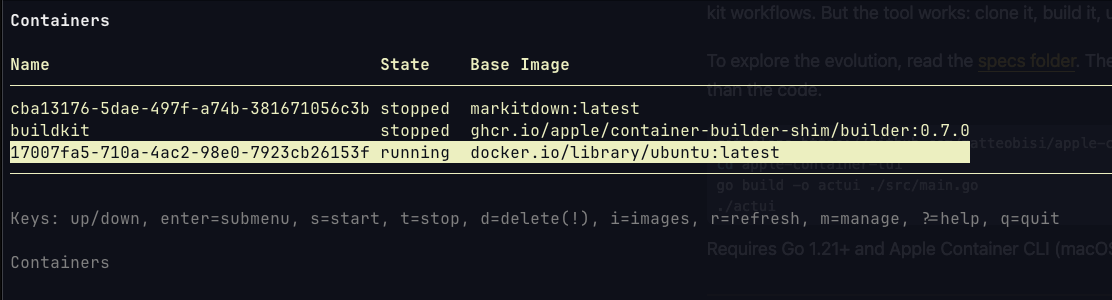
Image Management
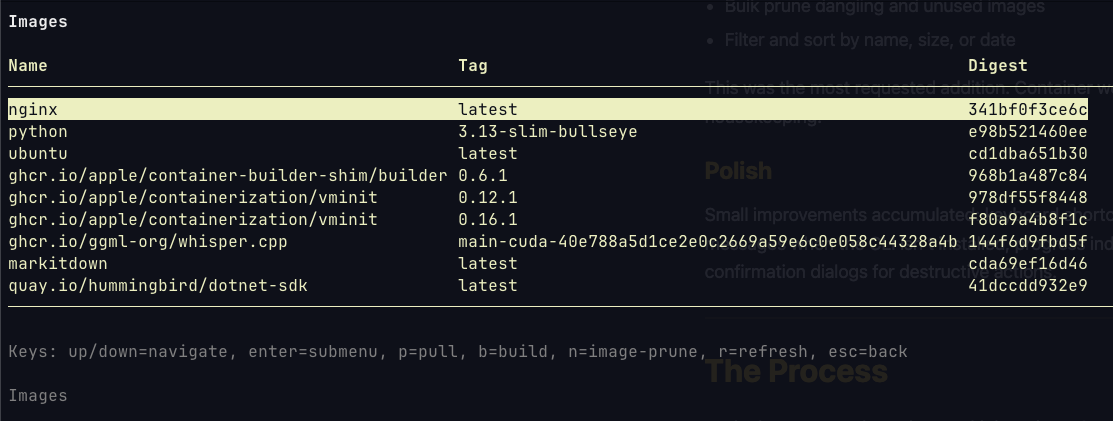
The original implementation only pulled images. Now there’s a complete image management interface:
- List local images with size and creation date
- Inspect image layers, environment variables, exposed ports
- Remove individual images with dependency checking
- Bulk prune dangling and unused images
- Filter and sort by name, size, or date
This was the most requested addition. Container workflows inevitably involve image housekeeping.
Polish
Small improvements accumulated: keyboard shortcuts for power users, better error messages when the CLI isn’t installed, progress indicators for long operations, confirmation dialogs for destructive actions.
The Process
Each change went through spec-kit iterations. Same constitution, new specifications. The AI handled the architectural decisions: state management for navigation, parsers for different CLI output formats, pagination for large image lists.
The specs folder now contains four iterations:
001-apple-container-tui/: Original implementation (2.5 hours)002-submenu-restructure/: Hierarchical navigation003-image-management/: Complete image operations suite004-polish/: UX refinements and edge cases
Each directory has the full specification, task list, and decision log. The progression is documented, traceable, automatic.
Repository
The code lives at github.com/matteobisi/apple-container-tui.
I intentionally did not include binaries. This remains an educational repository about spec-kit workflows. But the tool works: clone it, build it, use it.
To explore the evolution, read the specs folder. The specifications tell the story better than the code.
git clone https://github.com/matteobisi/apple-container-tui.git
cd apple-container-tui
go build -o actui ./src/main.go
./actui
Requires Go 1.21+ and Apple Container CLI (macOS 15.2+).
The tool works. The specifications tell the story. And the process continues.